Getting started
After a few simple steps, you are ready to use your Suunto Smart Heart Rate Belt 2 to get accurate feedback about your exercise intensity.
Putting on belt
To start using the Suunto Smart Heart Rate Belt 2:
- Snap the Suunto Smart module firmly into the chest strap.
- Adjust the belt length as needed.
- Moisten the electrode areas with water or electrode gel.
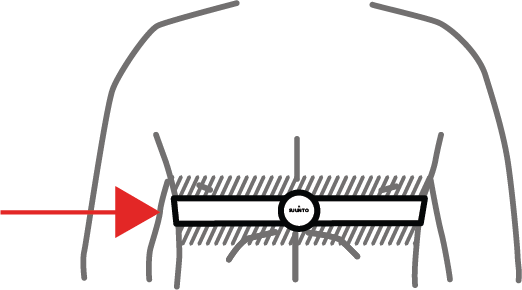
- Put the belt on so that it fits tightly and the Suunto logo is facing the right way, LED facing up and button facing down.
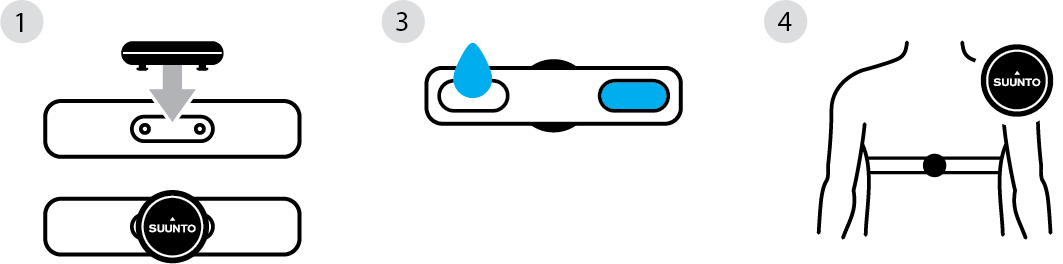
The belt turns on automatically when it detects a skin contact.
TIP:
Always wear the belt against your bare skin.
Bluetooth traffic encryption
Suunto Smart Heart Rate Belt 2 will encrypt the BLE communication so that the transmission remains protected.
Pairing
You need to connect (pair) your Suunto Smart Heart Rate Belt 2 transmitter with a compatible BLE host to view your heart rate and other data produced by the heart rate belt.
The procedure to connect the heart rate belt is:
- Wear the heart rate belt to power it on.
- Initiate pairing in the host device.
- Press the button for two seconds to accept the pairing request from the host. The host will be added to a known hosts list in the Suunto Smart Heart Rate Belt 2.
- Check that the pairing was successful. If you are in an environment with many active BLE sensors you will want to check that the serial number of the found sensor is the same as on the back side of the transmitter of your heart rate belt. Suunto Smart Heart Rate Belt 2 will show up as SHRM2 followed by the last four digits of the serial number. After pairing you will see the battery level and the services available from the belt if the host device has this capability.
- To pair a second and third host repeat the process from step 2 for each host. Suunto Smart Heart Rate Belt 2 can have an active connection to three hosts at the same time, but many more hosts can be on the known hosts list.
To initiate pairing in a Suunto watch go to the Connectivity menu inside the settings menu and choose Pair new device → Pair sensor or Pair HR sensor, depending on watch model. Remember to select the Suunto Smart Heart Rate Belt 2 into your relevant sports modes using the sport mode menu under the sports start wait screen.
The known hosts list
The Suunto Smart Heart Rate Belt 2 will accept connect requests from hosts, like sports watches, cycling computers, or mobile phones, without any user action if the host is on the known hosts list.
Pressing the button on the transmitter for 20 seconds results in a factory reset which clears the known hosts list. After the known hosts list has been cleared, hosts cannot anymore connect to Suunto Smart Heart Rate Belt 2 even if the host has the Smart Heart Rate Belt 2 in their list of paired Bluetooth sensors. Use the two-second button procedure described in the Pairing section to add hosts to the known hosts list.
NOTE:
REMOVING THE PAIRING IN THE HOST DOES NOT REMOVE THE HOST FROM THE KNOWN HOSTS LIST IN THE SUUNTO SMART HEART RATE BELT 2.
LED behavior
The Suunto Smart Heart Rate Belt 2 has a three-color LED that indicates the functional state of the heart rate belt. These are the statuses indicated by the LED.
| LED signal |
Meaning |
| No light |
The belt is either Off or in normal operating mode but saving power by keeping LED off, The power save mode can be turned off to keep the LED on. See Software update through Suunto App. |
| Green flash |
The belt is active and not in power save mode. |
| Green double flash |
A host has just connected. |
| Red light |
Low battery, change the battery. |
| Red→Green→Blue cycle |
Firmware is being updated or a factory reset is active. |
Software update through Suunto App
Suunto may offer software updates for the heart rate belt. To update the software, pair the heart rate belt with the Suunto App on an Android or iOS phone.
To pair the heart rate belt with the Suunto App, go to the device management area in the upper-left corner of the app's home screen, and then select the option to pair a heart rate belt.
Keep the heart rate belt connected to the Suunto App throughout the software download process.
Settings
After pairing the heart rate belt to the Suunto App a heart rate belt device screen will be accessible by pressing the heart rate icon on the top left of the home screen of Suunto App.
Settings will be available on the heart rate belt device screen.
Power Save: Switch off the LED of the heart rate belt after three minutes so that the LED does not consume power during the workout. The default setting is Power Save ON.
Running Form Measurement: If you are using a compatible Suunto watch you may want to switch on the running form measurement ON as it will give you insight on your running technique. The heart rate belt has inertia sensors for measuring the torso movement and algorithms that provide data based on this movement. This consumes battery so if you are not interested in running form data you may want to switch the running form measurement OFF. The default setting is Running Form OFF.